Every calendar, one day.

An Android calendar that merges Google, Outlook, Exchange, iCloud and calendar links into one agenda, briefs you on every meeting, and keeps your notes and AI on your phone.

Tuesday, 21 October
A sample day. Tap an account to switch it off and on.
  • Team stand-upOutlook · 15 min
    Join
  • Design review: new onboardingGoogle · 1 hour
    Join
  • Lunch with OmariCloud · 1 hour
  • Budget check-inOutlook · 30 min
    Join
  • Customer callGoogle · 45 min
    Join
  • School pick-upiCloud · 20 min
  • Five-a-side footballCalendar link · 1 hour
  • Dinner at Layla'siCloud · 2 hours
8 meetings from 4 calendars, in one day.

One day, built from every account.

Everything happens on the phone. No Plait account, no Plait server.

Every calendar, merged

Reads the calendars Android already syncs (Google, Outlook and Exchange, Samsung, iCloud through CalDAV), calendar links (.ics) with repeating meetings expanded, and Google Calendar directly. Switch accounts and calendars on or off.

Google
Outlook and Exchange
Samsung
iCloud (CalDAV)
Football link (.ics)

A home that follows the day

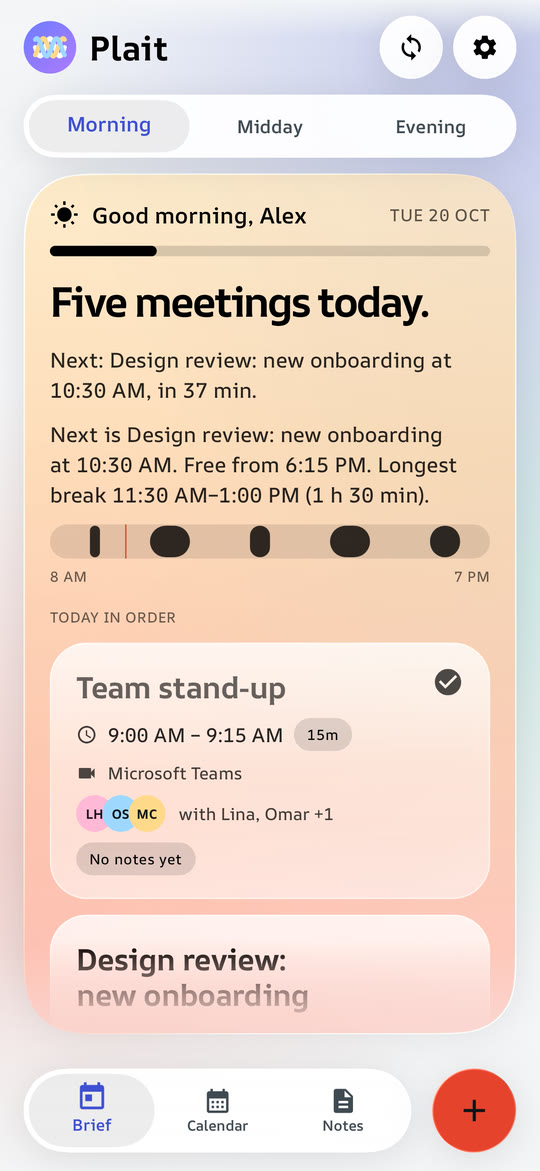
Morning, Midday and Evening cards. The morning card shows what's ahead, midday shows what's done and what's left, and the evening card shows time spent in meetings, which meetings still need notes, and a look at tomorrow with free focus time.

The morning card on the home screen, with the day's meetings

Meeting pages

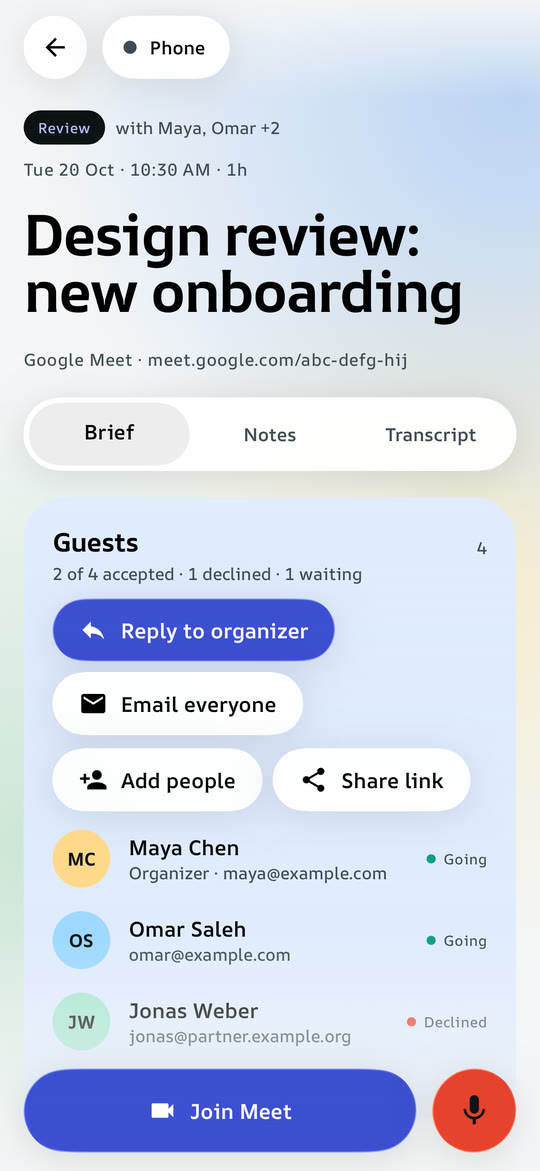
Guests and their answers, About this meeting in a short paragraph from the invite (or a careful one-line guess from the title), a summary of your notes, and one-tap Join for Teams, Meet, Zoom and Webex, including links hidden behind Outlook Safe Links.

A meeting page with guests and a short About paragraph

Manage meetings

For meetings you organise: edit details, reschedule, cancel one occurrence or delete the series. For meetings someone else organised: reply Going, Maybe or Decline. Works for phone calendars and Google, and guests are notified.

Design review: new onboarding
Organised by Jonas Weber
GoingMaybeDecline
EditRescheduleCancel this one

Notes four ways

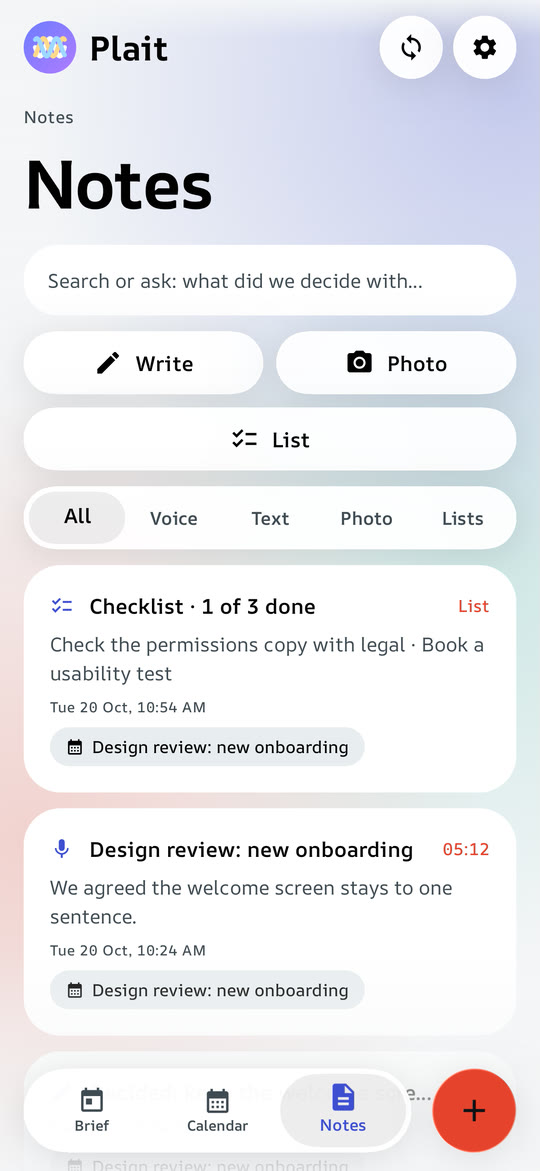
Voice with a live transcript while you record, even with the screen off. Write. Photo, read into copyable text, Arabic included. List, a checklist for agendas and follow-ups.

The notes library with voice, written, photo and list notes

Series remember

Notes, photos and lists from one meeting carry forward to the next meeting with the same name, with the decisions from last time and the follow-ups still open.

Last time
Decided: ship the new onboarding in two steps.
Send Omar the draft
Book the review room

Search that understands

Searches meetings, transcripts, written notes, photo text and emails, in English and Arabic. With an AI chosen, Plait expands your question into related words and names, then answers from your notes and shows its sources.

budget decision with Northwind
Budget check-in
Voice note · "we agreed to hold the budget"
Customer call
Written note · Northwind

Prep and follow-ups

A 30-second plan before each meeting: the goal, what to remember and what to raise. Plait suggests tasks from your voice and photo notes and reminds you of the ones you add. Follow-ups can be marked done or booked into a free slot.

Before the design review
Raise the two-step idea
Bring the draft numbers
Read Omar's notes

Alerts with Join

A reminder before each meeting says what it is for and has a Join button. It also shows on a paired Wear OS watch, and an evening nudge lists the meetings that still have no notes.

Plait · in 10 min
Design review: new onboarding
Decide how the first run is split.
JoinOpen

Share and sync

Share a meeting as a PDF, Markdown or text, or send your notes to a teammate. Sync between your phones through a folder you already use (Drive, Dropbox, Nextcloud, Syncthing), encrypted on the phone.

PDFMarkdownText
Sync folderDrive · encrypted

Quick add and free times

Type a sentence with who, when, how long and where, and the new-meeting form fills itself in. Find a time lists the free gaps across your calendars for the length you need.

Lunch with Omar Friday 1pm for an hour
WhenFri, 1:00 PM
Length1 hour
WithOmar

Backups you hold the key to

Export everything as one file, optionally sealed with a passphrase, and import it on a new phone. Importing only adds what's missing, and never replaces or deletes anything.

plait-backup
Sealed with a passphrase · 1 MB chunks
Import adds only what's missing
Watch the trailer full screen

Your day brief, in four sizes.

Resize the widget and the layout adapts. It shows the same day brief as the morning card, with the meetings handed over by the app, so it matches Home for every calendar.

5meetings today · next 10:30 AM
5meetings
Next: Design review
10:30 AMDesign review: new onboarding · in 42 min
Join
Today
9:00 AM Team stand-up
10:30 AM Design review
12:00 PM Lunch with Omar
1:30 PM Budget check-in
3:00 PM Customer call

AI on your phone, held to rules.

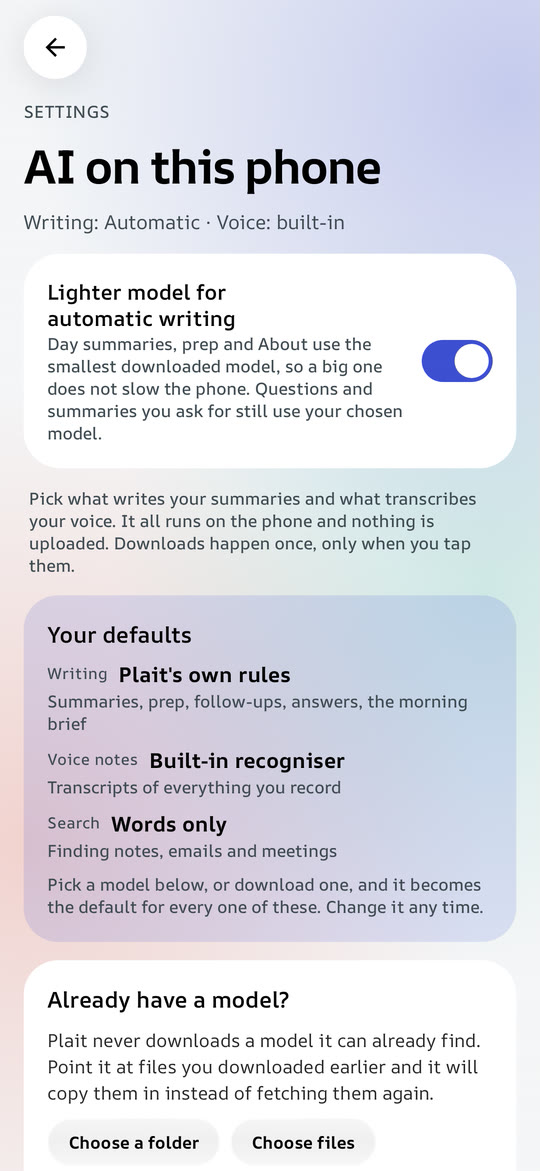
Choose the engine in Settings. Models download once (even with the app in the background), show their size first, are never downloaded twice, and can be deleted to get the space back. Nothing is sent to a cloud AI.

Engines

Gemini NanoML Kit GenAI on supported phones
Qwen3 0.6B / 1.7BLiteRT-LM, 347 MB / 977 MB
Gemma 4 E2BLiteRT-LM, the best, 8 GB phones
Qwen 2.5 0.5B / 1.5BMediaPipe, any phone
Whisper Tiny / Base / Smallsherpa-onnx, Arabic included
Meaning search6 MB text embedder
Rulesalways there, no model

Automatic writing (day summary, prep, About) waits until the screen has settled, then runs on the smallest installed model, so a big model never slows the app.

The AI on this phone settings screen

The harness every answer passes

  1. Clean input. HTML, style sheets, scripts, links, dial-ins and codes are removed in code first.
  2. Rules apart from material. Instructions go in the system message; the invite is fenced off as material, never instructions.
  3. Low temperature. 0.2, so the model keeps to the likeliest words.
  4. Fixed JSON shape. A short paragraph, a one-line guess or a list of tasks. A broken answer gets one retry.
  5. Checked in code. Word limits, no code or links, and no name or number that isn't in the source.
  6. Rules as the fallback. If nothing passes, plain rules take over.

Looks like Glass.

One switch in Settings rebuilds the whole app in the other style. Both follow light and dark mode, with pure black for OLED screens and a reduce-animations option.

Native Android, all the way down.

Kotlin and Jetpack Compose, release-built with ahead-of-time profiles, covered by 299 unit tests.

LayerTechnology
Language and UIKotlin 2.4, Jetpack Compose, Material 3 1.5 (expressive components), Navigation ComposeAndroid 8.0 (API 26) to Android 16 (API 36)
GlassKyant Backdrop: backdrop blur and lens refraction
CalendarsAndroid CalendarContract (read and write), Google Calendar API, an iCalendar parser with RRULE expansion
Language modelsLiteRT-LM 0.18.1, MediaPipe tasks-genai 0.10.35, ML Kit GenAI Prompt (Gemini Nano)
SpeechWhisper through sherpa-onnx for the live words and the final transcript, voice-activity detection with noise-adaptive thresholds
Text in photosML Kit Text Recognition (Latin), Tesseract 4 (Arabic)
SearchWord index plus a MediaPipe text embedder for meaning, with query expansion by the chosen model
Backup and syncAES-256-GCM, key from PBKDF2-SHA256, sealed 1 MB chunks; merge by adds and tombstones so a sync can't lose a note
Widget and alertsRemoteViews size-mapped layouts, exact alarms, a microphone foreground service
SpeedRelease build with profileinstaller, a single-canvas month grid, and still backgrounds when glass is off

Your calendar is nobody's business.

No account, no analytics, no ads, no server of its own. Recordings, notes, photos and models stay in the app's storage. The network is used only for calendar links, Google Calendar if you connect it, model downloads you start, the sync folder you choose, and a check for new versions of Plait on GitHub (at most twice a day, nothing about you is sent, and it can be switched off).

0

Plait servers, accounts and ads.

What Plait asks for

READ_CALENDAR, WRITE_CALENDARShowing your calendars; saving new meetings, edits, reschedules, cancellations and replies
RECORD_AUDIO, FOREGROUND_SERVICE_MICROPHONEVoice notes, including while the screen is off. Only your own microphone is recorded
POST_NOTIFICATIONS, SCHEDULE_EXACT_ALARMMeeting alerts with Join, and the evening notes reminder
RECEIVE_BOOT_COMPLETEDPutting the alerts back after the phone restarts
INTERNETCalendar links, Google Calendar, model downloads, sync and update checks, nothing else
FOREGROUND_SERVICE_DATA_SYNC, WAKE_LOCKKeeping a model or update download going when you leave the app
REQUEST_INSTALL_PACKAGESInstalling Plait's own updates, after you allow it once
Contacts and photosThrough Android's own pickers. Plait sees only the contact or picture you pick
Up and running in a minute.

First, download plait.apk from the latest release on your Android phone (Android 8 or newer).

plait.apk for 64-bit phones. On an older 32-bit phone, take plait-armv7.apk.

Then open it. If Android asks, allow your browser or file manager to install apps.

Settings → Allow from this source

Tap Use my phone's calendars and allow access. Every account on the phone appears straight away.

The home screen once the calendars are connected

Optional: add calendar links or Google in Settings, and pick an AI model under Settings → AI.

Braid your calendars into one day.

Download the APK Open an issue

Plait is made by one person. Following on X is the best way to say thanks and to hear about new features first. Bug reports and ideas are welcome in the issues.